Conviva captures frustration signals as measurable indicators derived from user interaction data that reflect potential user dissatisfaction, confusion, or friction during a digital experience. These signals identify behavioral or technical anomalies observed in digital experiences. Conviva’s common set of metrics quantifies these signals and their impact on user journeys. Key frustration signals highlight occurrences of user friction, such as rage clicks (repeatedly clicking on an element in frustration), excessive app restarts, and clicks preceding web errors and mobile app crashes. Each frustration signal provides insights into specific user behaviours indicating potential areas for experience and performance improvement.
Frustration signals help to:
-
Identify why users drop off or fail to convert.
-
Quantify the impact of poor experience on user behavior within Funnels, Journeys, and Sessions.
-
Analyze the root cause by correlating frustration events with technical, device, or browser dimensions.
|
Signals |
Defintions |
|---|---|
|
5xx Network Request Failure to App Background (Beta) |
This metric to correlate server network request issues with app state transitions to background (user inactivity). This metric counts how often a 5xx network request failure is followed by the application transitioning to the background within 10 seconds, highlighting server-side request-handling issues that impacted user app activity. For structured server issue analysis, Conviva DPI integrates network dimensions, such as host and path, as associated dimensions. For more details, see 5xx Network Response to App Background. |
|
ANR -> Restart |
The percentage of the conviva_anr (Application Not Responding) event followed by an app restart in less than 30 seconds. The metric is calculated as the number of conviva_anr (Application Not Responding) events where the user restarted the app in less than 30 seconds, divided by ANR to App Startup Init. For more details, see ANR -> Restart. |
|
App Crashes |
The proportion of sessions with application crashes in a native application. This calculation divides the number of sessions containing native application crashes by the total native app session count. For more details, see App Crash V2. |
|
Crash -> Exit |
The percentage of sessions that become inactive within 30 seconds after an app crash. This metric measures the count with which users end their sessions immediately following a crash, reflecting the extent to which the crash impacts the user experience. For more details, see Crash -> Exit. |
|
Mins with ANR -> Restart |
The percentage of one-minute intervals in app sessions with at least one of these events followed by an app restart within 30 seconds:
The metric is calculated as the count of one-minute intervals in app sessions with a conviva_anr, conviva_anr_v2, or conviva_crash_v2 (iOS Watchdog Termination) event and the user restarted the app within 30 seconds, divided by the total active minutes. For more details, see Mins with ANR -> Restart. Note: Enabling the # mode displays the metric in number format, representing the total count of one-minute intervals in app sessions with a conviva_anr event followed by an app restart in less than 30 seconds. |
|
Page Loop (Beta) |
This metric measures the frequency or the number of instances when the same page URL in a web app is visited three or more times within 15 seconds, highlighting navigation instability or friction within the page navigation of the user journey. Frequent page looping might be a strong signal of confusing page structures or broken navigation paths. User struggles with progress due to validation errors or inconsistent state handling. For more details, see Page Loop.
|
|
ANR -> Exit |
The percentage of sessions that become inactive within 30 seconds after the app fails to respond. This metric measures the count with which users end their sessions immediately after the app fails to respond, reflecting the impact on user experience. For more details, see ANR -> Exit. |
|
ANR Count |
The total count of conviva_anr events during the specified time interval. For more details, see ANR Count. |
| Click ->Error (Beta) |
This metric captures the number and percentage of user interactions that are directly followed by a web error or mobile crash. Web Error : For web users, a web error (any recorded client- or server-side error event (e.g., JavaScript error)) triggers in response to the click. Mobile Crash: For mobile users, a fatal error that results in the immediate termination of a mobile application on a mobile device after a click. This metric expressed as a percentage indicates the level of user interactions that led to web errors and mobile crashes. For more details, see Click -> Error. |
|
Crash -> Restart |
The percentage of impacted minutes in app sessions with application crashes followed by an app restart in less than 30 seconds. The metric is calculated as the count of impacted minutes in app sessions where an application crash occurred and the user restarted the app in less than 30 seconds, divided by the count of active minutes. For more details, see Crash -> Restart. Note:
Enabling the # mode displays the metric in number format, representing the total count of impacted minutes in app sessions with application crashes followed by an app restart in less than 30 seconds. |
|
Mins with Crash -> Restart |
The percentage of one-minute intervals in app sessions with at least one app crashes followed by an app restart in less than 30 seconds. The metric is calculated as the count of one-minute intervals in app sessions with at least one app crashes followed by an app restart in less than 30 seconds, divided by the count of active minutes. For more details, see Mins with Crash -> Restart. Note:
Enabling the # mode displays the metric in number format, representing the total count of one-minute intervals in app sessions with application crashes followed by an app restart in less than 30 seconds. |
|
Rage Clicks (Beta) |
This metric measures the frequency of users engaging in rapid, repetitive clicks on the same UI element, typically indicating a high level of user frustration. This metric tracks instances in which users perform three or more clicks on the same clickable UI element within a two-second time window without any meaningful interaction or response. For more details, see Rage Clicks. Note: Rage Click supports xPath dimension, which helps identify unique elements (works best with js-1.4.19). |
Frustration Signal Analysis
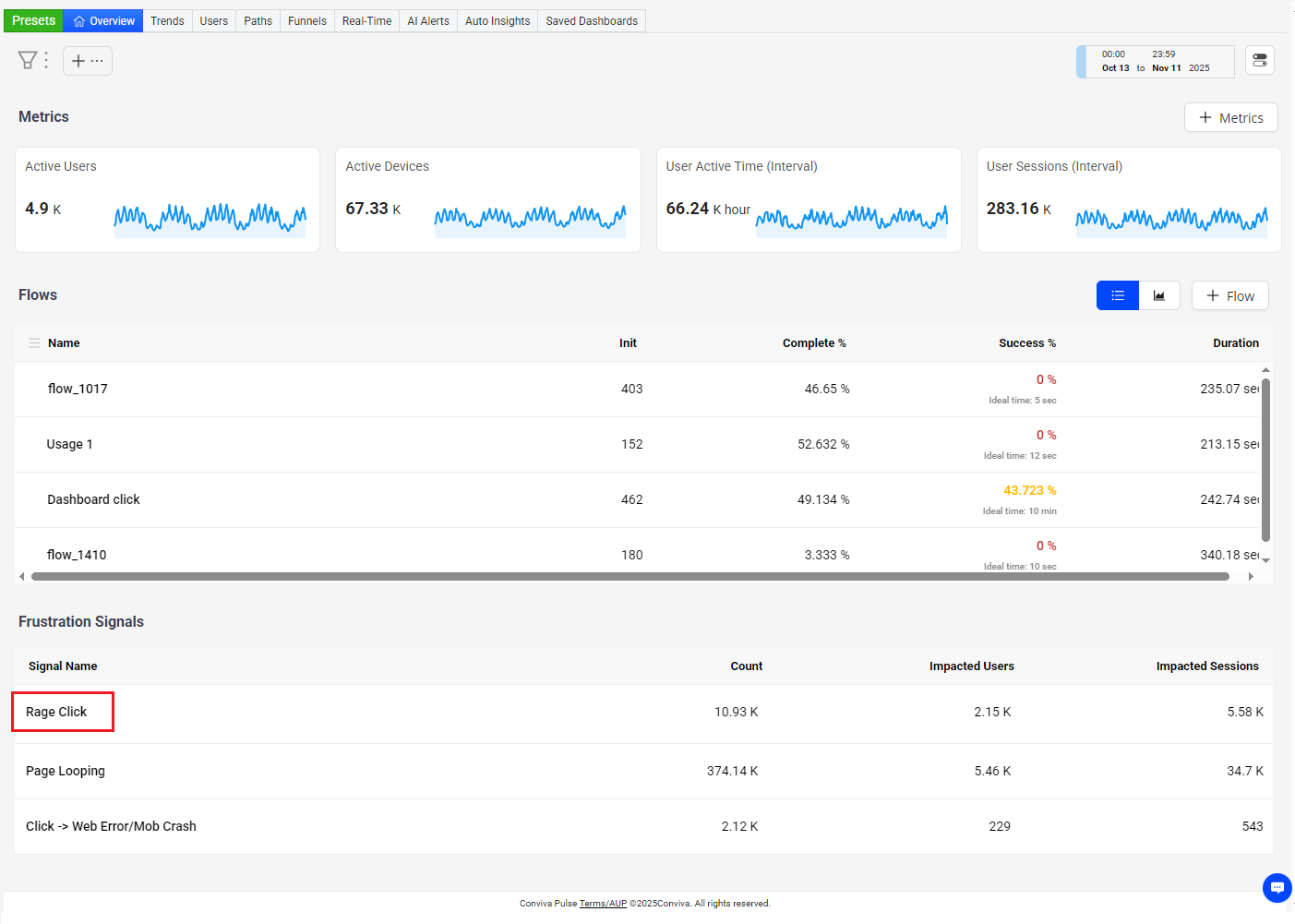
Use the Overview dashboard to display Frustration Signals related to the current Flows. Clicking a signal name opens the preset page for detailed analysis of the user impact and signal behavior.
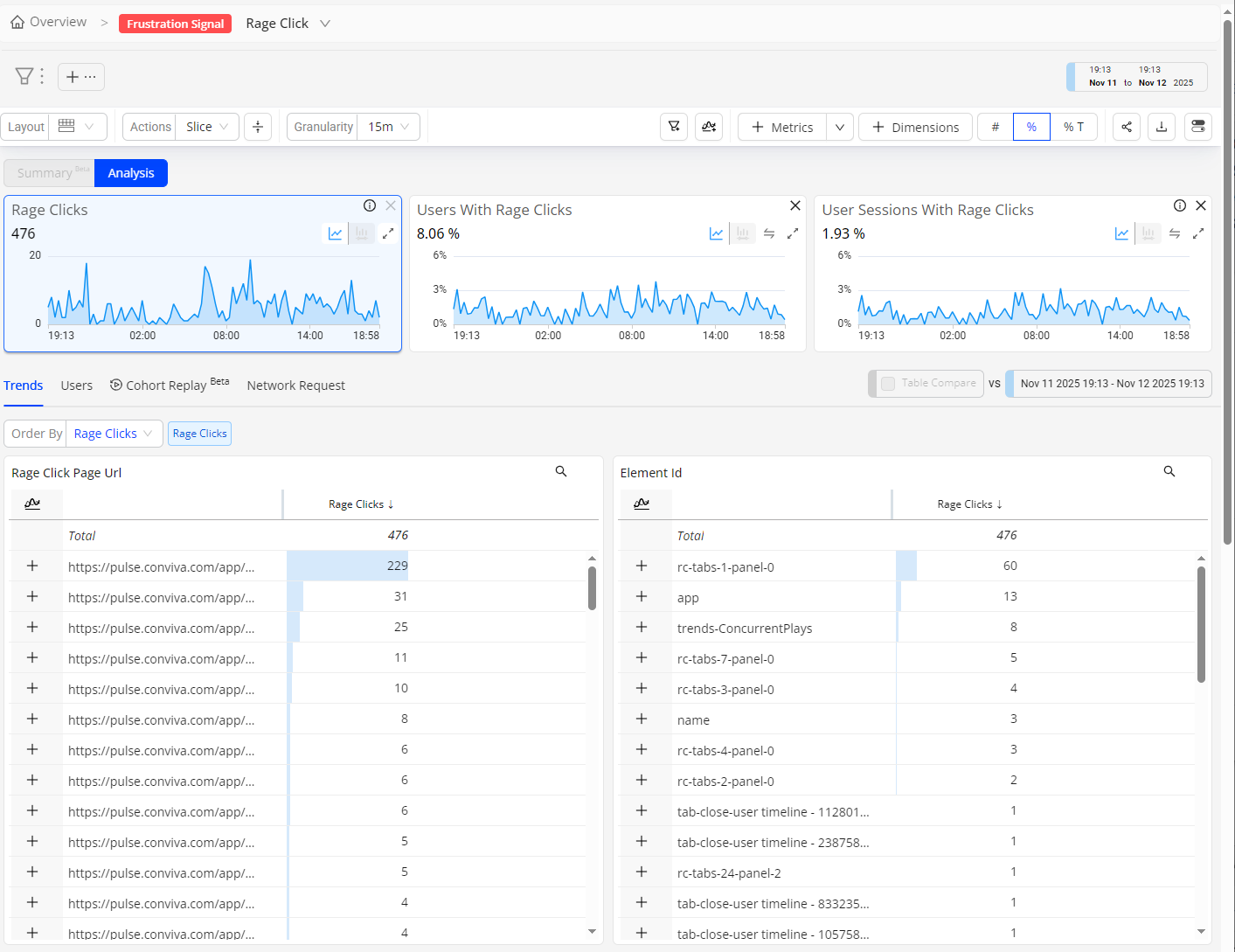
In this example, the Frustration Signal page displays user time series for data slicing and the dimension tables for pages and UI elements originating rage clicks, enabling advanced drill-down snalysis across imapcted user, pages, and UI elements.
In this example, the Frustration Signal page displays user time series for data slicing and the dimension tables for pages and UI elements originating rage clicks, enabling advanced drill-down analysis across impacted users, pages, and UI elements. Notably, https://pulse.conviva.com/app/... stands out as the top page with 229 rage clicks, and the rc-tabs-1-panel-0 tab panel element leads among UI elements with 60 rage clicks, highlighting the key sources of user experience issues.
Use the Frustration Signal selector to quickly switch the analysis between other signals.
For metric time series, dimensional drill-downs, and other methods for anomaly analysis, see DPI Trends.
Frustration Signals Frustration Signals Rage Clicks User Sessions with Rage Clicks Users with Rage Clicks Page Loop User Sessions with Page Loop Users with Page Loop Click ->Errror User Session with Click ->Errror Users with Click ->Errror Excessive App Restarts User Sessions With Excessive App Restarts Users with Excessive App Restarts 5xx Network Request Failure to Element Xpath App Background Frustration Signals