Conviva Connect: Flow Feed
A Flow represents the metrics and metadata of a section of user journey. For instance, a Login Flow’s metadata could describe the method the user has attempted to login (OTP, SSO, and others), the Flow metrics illustrate the time it took the user and whether they were successful or not.
To learn more about Flow Feed, click here.
Reconstructing User Journey
Reconstruct a user’s journey through the app as it unfolds. Each time a Flow completes or times out, the system sends it to the Feed, enabling precise tracking of how the user navigates and the experience being consumed. When the engagement ends and the session terminates, the system adds a consolidated summary of the entire session to the Feed.
For use cases that require near real-time insights, such as powering a recommendation engine, teams should ingest individual Flow data. For scenarios that are less time-sensitive and do not require fine-grained detail, teams can ingest only the Session data.
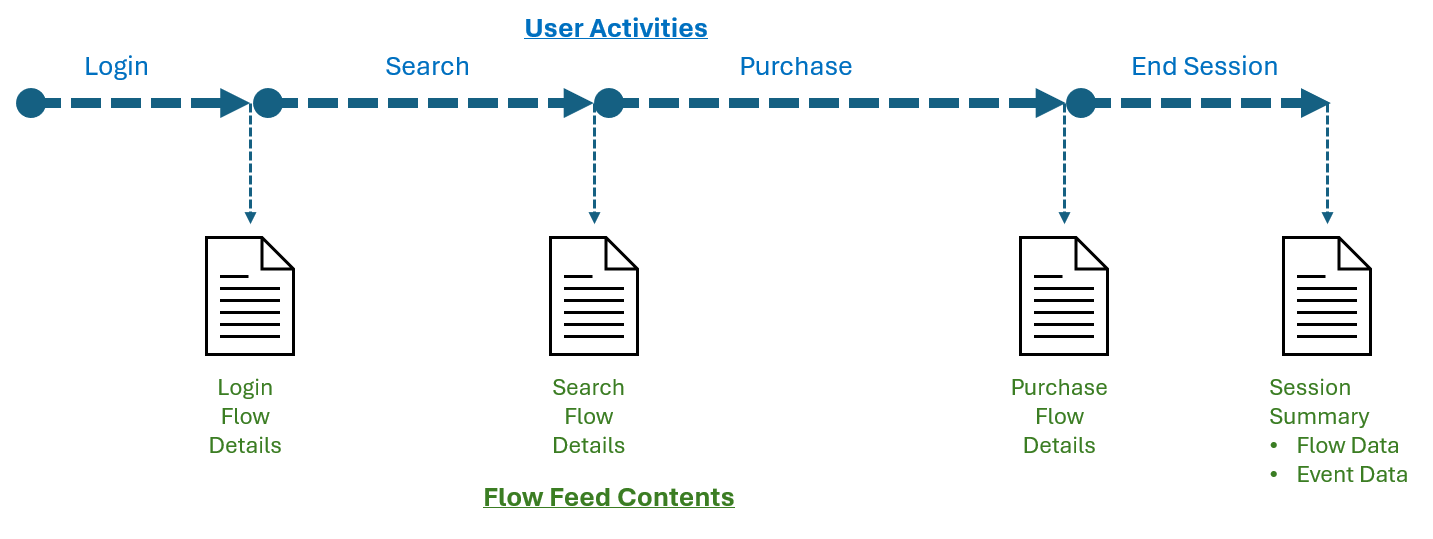
Each line of the Flow Feed describes one completed Flow. Completed Flows include Flows that have timed out as well as ones reaching their final state.
Flow data includes:
-
High level Flow metadata
-
Details of the end user who created the Flow
-
Flow metrics and metadata
Since a session is a special type of Flow, sessions are also included in the Flow Feed, summarizing the user’s engagement with your app.
Use Flow Feed to extract Flow Name/Session ID-wise Metrics and Metadata, including associated device, app, location, and network information at the frequency of hour/minute.
-
Out-of-the-box metrics aggregated at the Session level
-
Custom-defined Flows and custom metrics
Flow Feed Schema
Each line of the Flow Feed record contains the information:
| Flow Details | Location | Device | App | Network | Metrics | Metadata |
|---|---|---|---|---|---|---|
|
|
|
|
|
|
All mapped tags |
Connect Data Feed Connect Data Feed Connect Data Feed DPI Flow Feed DPI Flow Feed DPI Flow Feed